
Automated Free Local Listing: Are You Opted In?
Google is expanding free local visibility for retailers with physical stores - this means more products can show as free local listings across surfaces like Search and Maps.
Google doesn’t appear to be enabling this for everyone at once, so keep an eye on emails from Google and check your Merchant Center notifications to see what’s been switched on for your account.
The good news: this isn’t a “build a new local feed” job. With Google’s automated approach, you don’t need a separate local inventory feed. Google uses your existing online product data source plus signals from your website to power the local display.
So, Who is this for?
This is designed for retailers with:
Brick-and-mortar stores (at least one physical location)
A verified Google Business Profile for that location
A website where shoppers can check store availability
Why this matters (if you’re not on Local Inventory Ads)
If you’don’t have a local inventory feed in place, this is a strong way to unlock free local visibility, and a smart way to prove local demand before investing in paid LIA feed.
What you need in place
Automated free local listings rely on shoppers being able to check store availability on your website. Google describes this as customers clicking something like “Check in-store availability” or “Find nearby”, with data passed via Tag Manager.
To enable it cleanly, you typically need:
A verified Google Business Profile, linked to Merchant Center
A clear on-site option like “Check in-store availability” / “Find nearby”
Google Tag Manager is in place to send the availability signals
A store location page and structured data (schema markup)
A product data source in Merchant Center (still required — you’re just avoiding a separate local inventory feed)
Where Free Local Listings appear (vs Local Inventory Ads)
Free local listings and Local Inventory Ads (LIA) aren’t the same thing. They can use similar availability signals, but they show up in different places:
Free local listings show your in-store products in organic local surfaces like Search and Maps (including “See what’s in store”) and don’t carry an “Ad” label.
LIA placements are paid ads that appear in Shopping/Search/PMax-style ad inventory and are driven by bids and budgets.
What to do next
1) Check Merchant Center
A) Go to Settings → Add-ons
B) Confirm Free local listings is enabled, and the method of listing delivery (Free Local or LIA)
C) Disable it if you don’t want the free exposure
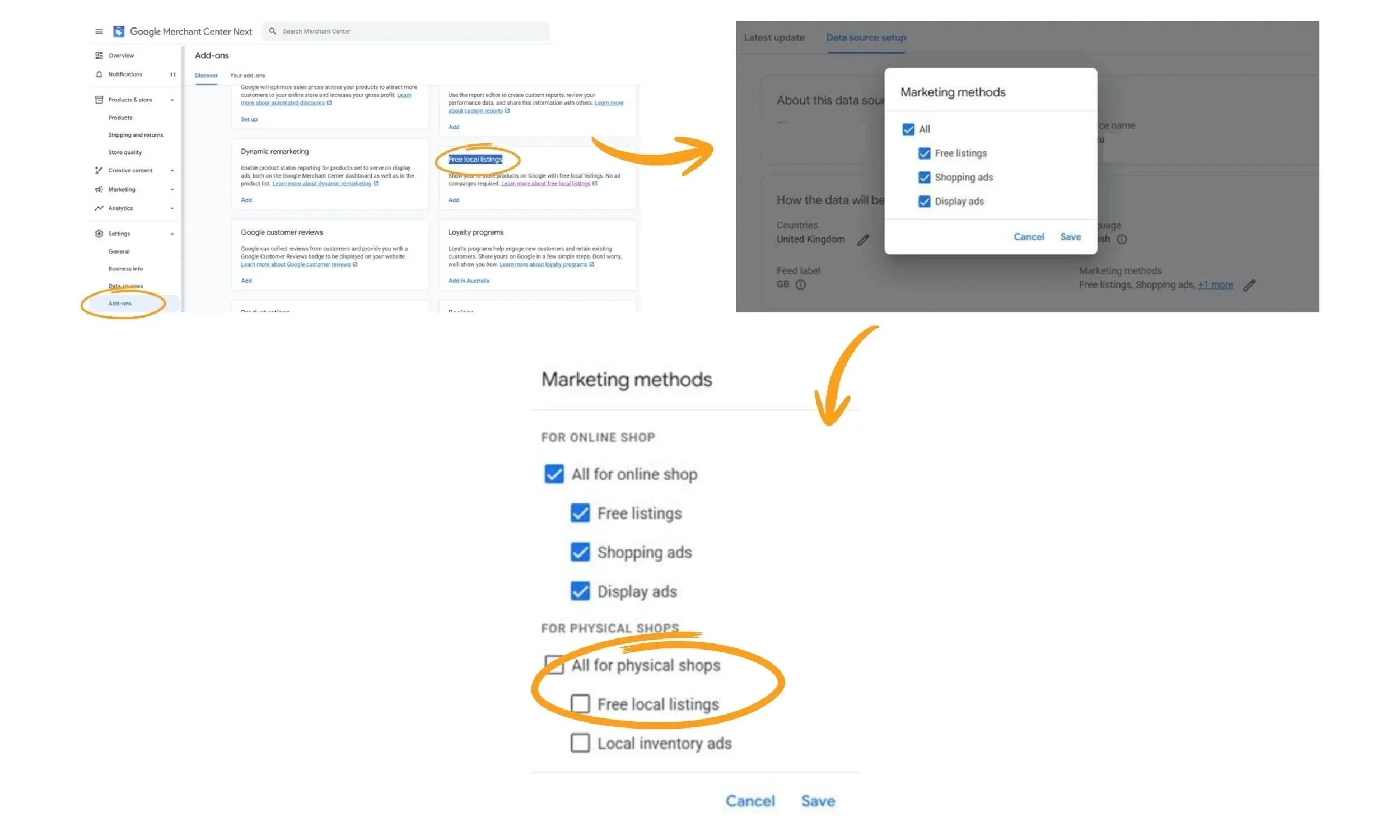
2) Sanity-check accuracy
Free visibility is great, as long as shoppers see the right stock and the right price. If your store availability experience isn’t reliable, fix that first.
3) Monitor impact
Once enabled, watch for changes in local visibility and engagement, and keep an eye on any availability/price issues, because local trust is fragile.
Need help with your feed strategy?
Book your Google Shopping Audit and we’ll review your feed and Merchant Center setup to show what’s holding you back and get your account under control before issues cost visibility and revenue.
